Score: 3.50 Votes: 8
rate this

A quick Rapidshare Tutorial

Starter: [Deleted] Posted: 19 years ago Views: 5.6K
  • Goto:
#2475791
Most Members here seem to dislike Rapidshare. Maybe this Tutorial helps a few of you to download vids from there


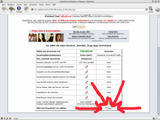
Step one

After you clicked on the RS link, a window like this should appear. Now simply click on the highlighted "free" button


Step two

Now you got to wait for a short amount of time as displayed here:


Step three

After the cllock ran down to 0 seconds, the screen should switch to this. Now simply fill in the displayed letters into the blank box and hit "download"



Step four

Et voila, you have your vid and choose where to store it

* This post has been modified : 19 years ago

#2475792
Lvl 6
Has never got to stage 4..................... never seen that save box!!
* This post has been modified : 19 years ago

#2475793
Lvl 7
Good Tutorial. Thank you!
* This post has been modified : 19 years ago
#2475794
i think RS has some problems with your IP.
* This post has been modified : 19 years ago

#2475795
Lvl 19
You should add the waiting information about downloading multiple files. After downloading one file, you have to wait xx minutes to download another.

I fucking hate it.
* This post has been modified : 19 years ago
#2475796
Lvl 6


Quote:
Originally posted by Ascaris

You should add the waiting information about downloading multiple files. After downloading one file, you have to wait xx minutes to download another.

I fucking hate it.
* This post has been modified : 19 years ago

#2475797
Quote:
Originally posted by Ascaris

You should add the waiting information about downloading multiple files. After downloading one file, you have to wait xx minutes to download another.

I fucking hate it.


you should be here long enough to know how to circumvent that!
* This post has been modified : 19 years ago
#2475798
Lvl 19
Quote:
Originally posted by j0lly

[reply=Ascaris]
You should add the waiting information about downloading multiple files. After downloading one file, you have to wait xx minutes to download another.

I fucking hate it.


you should be here long enough to know how to circumvent that!
[/reply]

If you're talking about changing your ip and that shit, doesn't work for me.
* This post has been modified : 19 years ago
#2475799
Lvl 11
the problem is your proxy server...some isp's have a central proxy server and rapidshare only sees this IP, not yours so you end up with a message saying "you are a bot". Also get a message sometimes saying "ip address xxx.xxx.xxx.xxx has downloaded xMb, please wait"(or something along those lines. hope this helps.
* This post has been modified : 19 years ago
#2475800
Disconnect --- connect?

using a router: log off --- log on ?
* This post has been modified : 19 years ago
#2475801
Lvl 29
Or just wait. Why is everyone always in such a big hurry? Anything worth having is worth a relatively short wait.


Patience is everything.
* This post has been modified : 19 years ago
#2475802
Lvl 13
but really there are people that needing this tutorial?
* This post has been modified : 19 years ago
#2475803
Lvl 19
My problem is my ISP's DHCP server. It always gives me the same IP address. It's basically statical address, and I can't change it when I want to. So your "neat trick" is fucking useless.

And I can't use my own statical IP, because my internet doesn't work after that. I have to use DHCP.
* This post has been modified : 19 years ago
#2475804
Lvl 4
Yep, sometimes rapidshare just makes me angry, especially when the vid I wanna download consists of three parts and I have to wait HOURS before I can watch it. But most of the time it works fine for me. And now that the size is up to 200-300 mbs, there´s no problem. After all, rapidshare is fast and good, never had any problems. So thanks for the tutorial, jolly.
PS: I liked your squirrel-avatar better
* This post has been modified : 19 years ago
#2475805
Lvl 10
Thanks jolly for this tutorial

An additional hint:

Dependin' on your systems language, rapidshare provides an english interface as well. So there might be no problems in understandin' what to do ;:
* This post has been modified : 19 years ago
#2475806
Lvl 7
The one problem i have is:

Sometimes i do all the steps perfect. Then at step the "type the text in the picure" step. i type the Text perfectly, same CaSe etc. but it says "invalid session". i can try it several times on the same file, always the same error, even on different days. i can on the other hand emediatly open another file to download, and presto it works........

And that is why RS sucks dick in my books
* This post has been modified : 19 years ago
#2475807
Lvl 14
Quote:
Originally posted by j0lly

Most Members here seem to dislike Rapidshare. Maybe this Tutorial helps a few of you to download vids from there


Step one

After you clicked on the RS link, a window like this should appear. Now simply click on the highlighted "free" button


Step two

Now you got to wait for a short amount of time as displayed here:


Step three

After the cllock ran down to 0 seconds, the screen should switch to this. Now simply fill in the displayed letters into the blank box and hit "download"


Step four

Et voila, you have your vid and choose where to store it


Thank you for educating me on that. I do appreciate it.
* This post has been modified : 19 years ago
#2475808
I know this Tutorial wasnt necessarily needed. otherwise it would have been stickied.


but it is also meant as place where everyone can either vent his anger about RS, ask for other upload hosts or just simply get help on RS questions
* This post has been modified : 19 years ago
#2475809
Lvl 7
Sorry, J0lly.

Sorta feel like and ass now not not thanking you for you effort. so THANKS!
It's not your fault RS sucks (in my books)
* This post has been modified : 19 years ago
#2475810
I just started getting "invalid sessions" and proxy server problems about a week ago
* This post has been modified : 19 years ago
  • Goto: